 Yan.app
Plugin guide
Add workspace tools, editor integrations and API workbenches to Yan.
Yan 1.0.4 and later support plugins.
Install and open a plugin
- Get the
.toolboxpluginpackage from its developer. If you’re using an earlier version, update Yan from the Mac App Store. - In Yan, choose More Tools → Plugin Center → + → Import Plugin…. Select the package and review the permissions shown before installing.
- Select the plugin in Plugin Center to read its overview and see its available commands or panels. Find workspace tools in More Tools and plugin commands in the ⌘K command palette.
23 offline workspace tools
- QR codes and barcodes. QR Code and Code 128 Barcode generate PNGs from text.
- Digests and credentials. MD5 Digest, Hash / HMAC Calculator, JWT Inspector and Password Generator.
- Text and data. Cron Expression, Regex Tester, Diff Viewer, JSON Viewer, CSV Viewer, Log / JSONL Workbench and Text Statistics.
- Encoding and escaping. Base64, URL, Unicode, HTML Entities and Hex conversions.
- Generation and conversion. ID Generator, Timestamp, Color Picker, Radix Converter and Data Size Converter.
Use JSON Viewer to browse or query JSON. Use CSV Viewer to filter, sort and export tables. Log / JSONL Workbench can filter UTF-8 logs by level or JSON Pointer and track a file you select.
Editor and API plugins
- API Console
- Organize HTTP requests into collections, use environment variables and inspect responses or assertion results.
- SOAP Workbench
- Import WSDL, browse operations and send SOAP requests.
- IP and Network Diagnostics
- Check your public IP, IP registration, DNS responses and web service status.
- HTML Code Editor
- Choose it under Settings → Plugins → Formatting and Preview to edit HTML in a document tab or split view.
- Visual JSON Editor
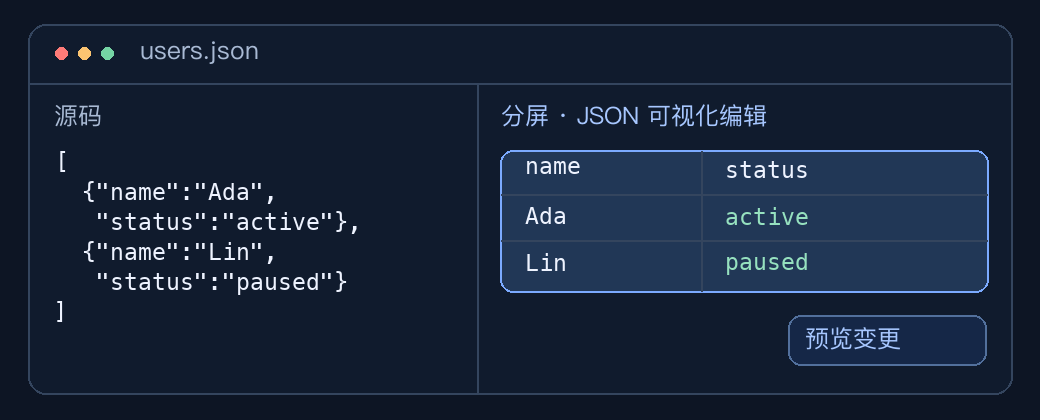
- Open a JSON document and run the plugin command to edit objects and arrays in a tree or table.
- Inline Inspect
- Hold ⌘ and hover over text to see details about supported values.
- Structured Snippets
- Format or extract JSON, XML and object literals embedded in mixed text or logs.
- Project Workbench
- Try task tracking and project notes with local sample data.
Manage permissions and workbenches
The 23 workspace tools process data locally. For plugins that use the network, such as API Console or IP and Network Diagnostics, check the Permissions tab to review or disable network access. You can also disable or uninstall an installed plugin from its detail page.
Supported versions of Yan offer a Workbench menu for switching between the editor and installed workbenches such as Log / JSONL. If you enabled Replace Main App for a workbench, use Manage Plugins… in the app menu or press ⌘, to change that setting.
Plugin development
Illustrated plugin examples (Chinese)
See inline actions, a timestamp inspection card, and an editable JSON table in split view. The guide maps editor regions to plugin contribution points.
JavaScript plugin guide (Chinese)
Build a text action, then explore commands, tool panels, editor APIs, permissions, debugging, and packaging.
Declarative extension guide (Chinese)
Add languages, syntax highlighting, themes, and keybindings through a manifest.